|
|
|
─── FxMedSupport 2.0 · Email 2 of 3 · The Heidi Release
Your AI scribe
just got exponentially smarter.
Until now, getting Heidi to produce a great encounter required real work. Manual uploads. Copy-paste. Context-gathering before every visit. The provider became a data entry assistant for their own AI. We are done with that.
|
|
Last week we said it plainly: Cerbo is the brain of your practice. We are the nervous system that carries Cerbo’s signal everywhere your practice operates. This week, we’re showing you what that actually means in your most important room — the exam room.
Heidi is brilliant. Cerbo is brilliant. Until now, the connection between them did the Heidi thing and the Cerbo thing — but never, fully, the provider thing. So we built the true bidirectional integration. The one your practice actually needs.
Patient demographics. Allergies. Past medical history. Vitals. Current medications and supplements. Historical lab trends. Every relevant piece of clinical context flows from Cerbo into Heidi before each appointment — automatically, on the schedule you set. The encounter generates with full clinical understanding of who’s in front of the provider. And when Heidi’s done? The finished encounter flows back into the Cerbo chart. Review. Edit. Sign. Done.
Zero copy-paste. Zero manual uploads. Three to seven minutes back per appointment, easily ten minutes or more per complex visit. Multiplied across a full provider day — that adds up to a fundamentally different rhythm of care.
|
|
|
10+
Min saved per patient
|
0
Manual uploads
|
100%
Auto-populated context
|
|
|
|
i. Before & After
Your provider stopped being a data entry assistant.
The shift from before to after isn’t subtle. It’s the difference between Heidi guessing and Heidi knowing.
|
|
|
Before
Heidi guessing.
— Manual copy-paste from Cerbo into Heidi for every appointment
— Provider gathers patient context by hand: meds, supplements, allergies, history
— Heidi runs without longitudinal data or current protocols
— Encounter notes missing context the provider has, but the AI doesn’t
— Manual upload of the finished note back into Cerbo
— 10+ minutes of admin work per visit, every visit
|
|
|
★ Now
Heidi knowing.
— Zero manual uploads. Every relevant data point flows automatically
— Demographics, medications, supplements, plans flow in by themselves
— Historical labs, vitals, and tracked trends pre-loaded into context
— Custom Provider Context Library (Thyroid, Hormones, Gut) attaches automatically
— Finished Heidi note flows back into Cerbo — review, edit, sign
— Provider focuses on the patient, not the keyboard
|
|
|
|
The provider just shows up to the visit and provides care. The keyboard work disappeared.
|
|
|
ii. The Custom Context System
Two systems. One smarter Heidi.
Beyond the auto-population of standard fields, the integration gives you two layers of custom context control — so Heidi gets the exact clinical depth your practice provides. Automatically. Every time. Per patient.
|
|
|
System 01 · Inside Cerbo
Context Folder System.
Designate any folder in Cerbo as a contextual data source for Heidi. Lab folders. Imaging folders. Custom intake folders. The documents inside become part of the contextual data Heidi receives — leveraging the structure Cerbo already gives you.
When a Heidi session starts, FxMedSupport matches the patient’s Cerbo tags to your designated subfolders. Documents whose folder name matches your tag get pulled into Heidi context automatically.
|
|
|
System 02 · Inside FxMedSupport
Provider Context Library.
Build custom context categories for the conditions your practice cares about most. Female Hormone Optimization. Male Hormone Optimization. Thyroid. Gut Protocols. Adrenal. Detox. Whatever drives your clinical work.
Upload your supporting clinical documentation — text, HTML, PDF, or Word files — to each category. Tag your patients with the relevant categories, and when Heidi runs, it automatically pulls in every piece of supporting context that matches.
|
|
|
Multi-Tag Support
Patients are complex. Care is complex. Heidi handles both.
A patient may need Female Hormone Optimization, Thyroid, AND Gut Protocol context all at once — because their care is layered, not linear. Multi-tag a patient with as many categories as apply, and Heidi will receive every relevant piece of supporting context automatically. The full picture. Every appointment. Every patient.
|
|
|
iii. Bidirectional · Both Ways · Always
Data flows out. Notes flow back in.
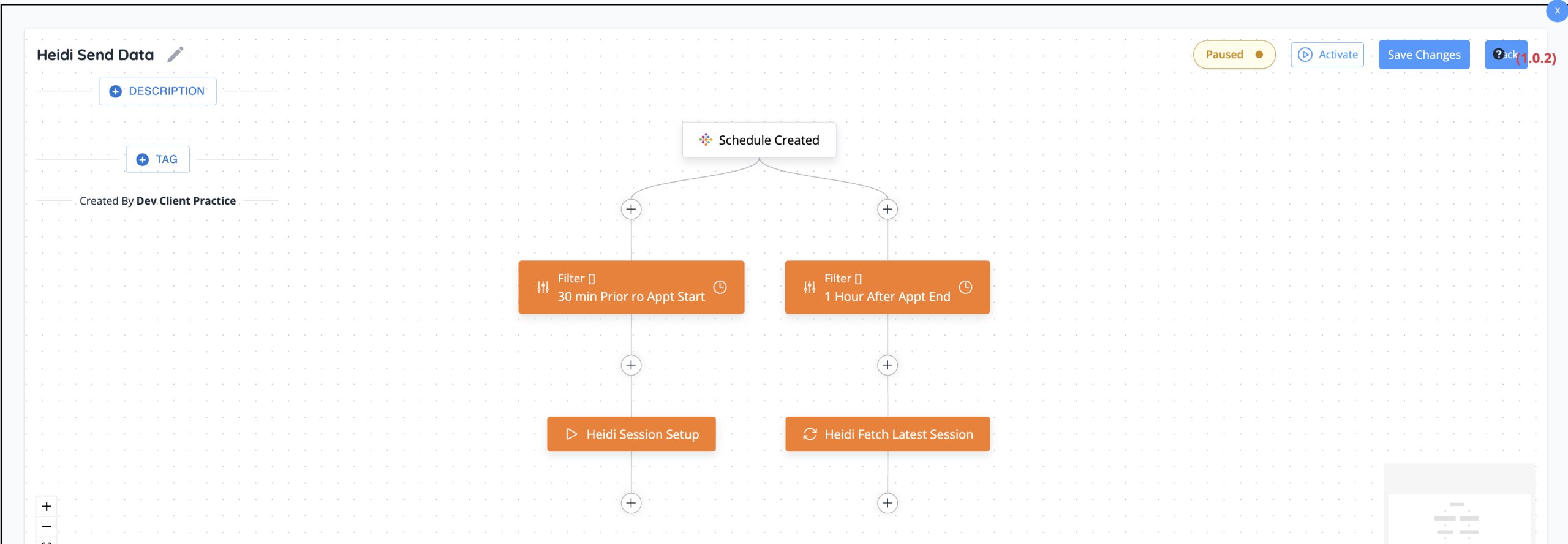
The integration runs as a complete automation loop. Cerbo data goes to Heidi before the visit. Heidi’s finished encounter comes back to Cerbo after. No human in the middle copying anything. Just a closed system that keeps both platforms in perfect sync.
|
|
|
Path 01 · Cerbo → Heidi
Send Data To Heidi.
On a schedule you control — typically 5 to 10 minutes before each appointment — FxMedSupport runs an automation that pulls every relevant data point from Cerbo and pushes it to Heidi.
— Schedule trigger fires before the appointment
— Filter checks the patient’s Cerbo tags
— Demographics, vitals, meds, supplements, allergies, history, and lab trends sent
— Custom Provider Context Library and folder docs attached automatically
|
|
|
Path 02 · Heidi → Cerbo
Get Notes From Heidi.
After the visit, Heidi creates the encounter note from the conversation. FxMedSupport runs the second half of the loop — fetching the finished session and delivering it back into Cerbo.
— Schedule trigger fires after the appointment
— Filter checks for completed Heidi sessions
— The note gets delivered into Cerbo, attached to the right patient
— Provider reviews, edits, saves, and signs — exactly as they always have
|
|
|
iv. Why This Matters
AI that finally understands who your patient is.
|
|
|
The best AI scribe in the world produces a mediocre note when it doesn’t know who the patient is. That has been the dirty secret of AI scribes since they arrived. The technology was never the problem. The context was.
Cerbo holds the context. Cerbo has always held the context. The patient’s history is there. Their medications. Their supplements. Their lab arc over years. Their plan items started and stopped. All of it, perfectly captured. What was missing was the bridge — the nervous system that could carry that signal from where it lives to where it’s needed, automatically, every single time.
We built that bridge. And then we built the layers above it — the Folder System and the Provider Context Library — so the depth of context Heidi receives matches the depth of care your practice actually provides. You decide what context matters. You tag your patients. We carry the rest.
The result isn’t just a faster note. It’s a smarter note. A note written by an AI that finally understands the human being on the other side of the encounter — because we made sure it had everything Cerbo already knew.
|
|
Want the Visual Walkthrough?
See the full integration live.
The Cerbo ↔ Heidi product page shows the data flow diagram, the multi-tag system, and every detail of how this actually works inside your practice.
See the full Cerbo ↔ Heidi page →
|
|
Ready to activate Cerbo ↔ Heidi?
Existing FxMedSupport practices: submit a ticket and we’ll turn it on. New to FxMedSupport? Open your account or schedule a demo built around your provider workflow.
|
|
|
─── What’s Next
Email 3 drops next week — the deep dive on Portal Cerbo Visual Reporting System, where Cerbo’s data finally becomes the living dashboard your team has always needed.
Then we shift to a monthly cadence of major updates as we ship. Provider i in weeks. The internal ticket system and lightweight CRM widget. And the next “I wish” the Cerbo community brings us.
|
|
|
|
The DreamMakers of Cerbo.
Built on Cerbo · Since 2016
|