|
|
|
─── FxMedSupport 2.0 · Email 3 of 3 · The Reporting Release
For the first time on Cerbo —
see your practice.
A way to see your medical practice that never existed on Cerbo before. Today, the Portal Cerbo Visual Reporting System is live — and the data you’ve been capturing for years finally has a face.
|
|
Three weeks ago we said it: Cerbo is the brain of your practice. We are the nervous system that carries Cerbo’s signal everywhere your practice operates. Then we showed you what that means in the exam room with the Cerbo ↔ Heidi bidirectional integration. Today, we close the trilogy — and we close it in the leadership room.
Cerbo’s reporting engine has always been one of the strongest assets in functional medicine — accurate, comprehensive, every metric you could want, captured perfectly. But until this week, the only way to see your practice was to download CSVs, build pivot tables, and try to remember which spreadsheet held the truth. No more.
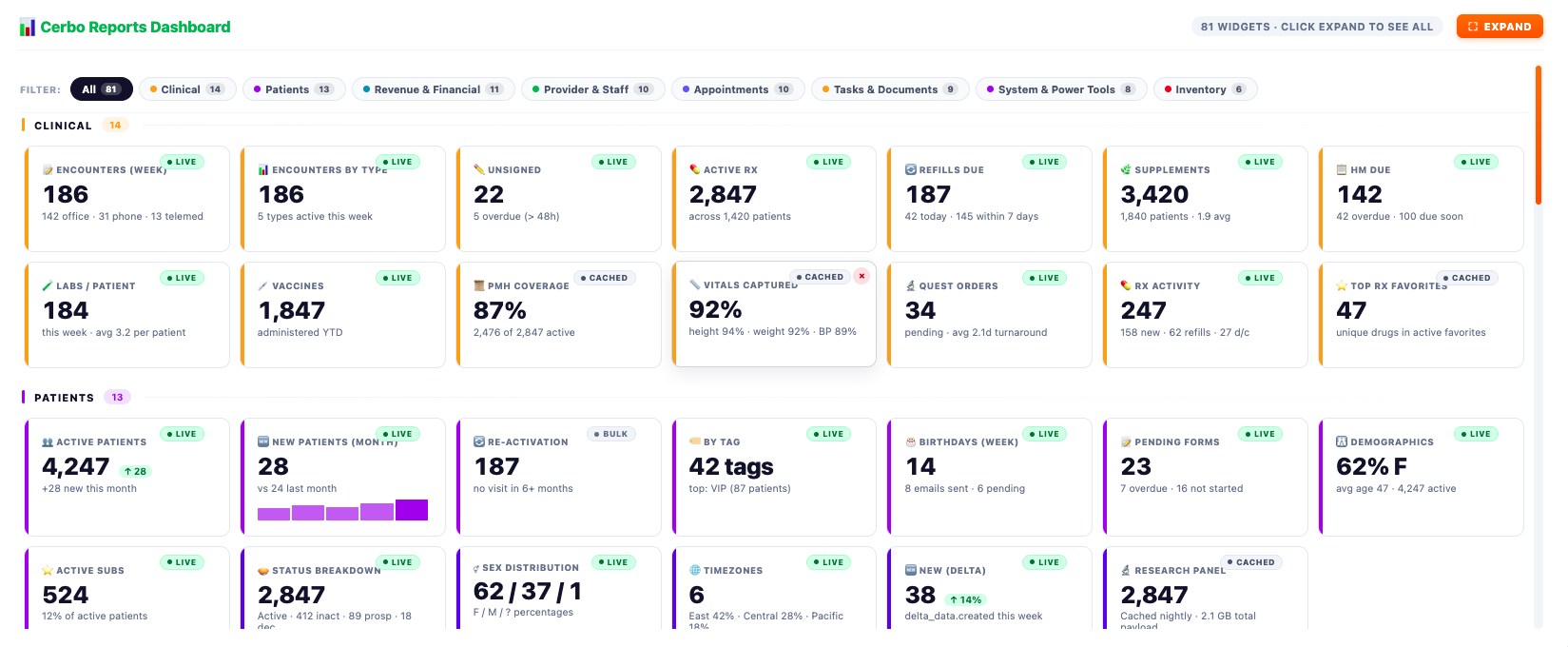
The Portal Cerbo Visual Reporting System takes the depth of Cerbo’s reporting and builds a fully visual, interactive layer on top of it. Eight categories. Every metric. Every trend. Every pulse-check on practice health — in one beautifully designed dashboard that brings the data to life. Then we made it shareable: pick the reports your team needs, choose who gets each one, set the cadence, and beautiful PDFs land in the right inboxes, automatically.
This is the picture of your practice. Cerbo holds the truth. The Visual Reporting System aligns your team to it.
|
|
|
8
Visual lenses
|
3
Tabs per report
|
∞
Auto-email cadences
|
100%
Team alignment
|
|
|
|
i. The Eight Visual Lenses
Every angle of your practice. One unified view.
We organized the dashboard the way your team already works — eight categories, eight visual lenses, every dimension of your practice in one place.
|
|
|
Lens 01 · Clinical
Your provider team’s pulse.
Encounters, vitals, labs, supplements, vaccines, RX activity, PMH coverage — instantly visible.
|
|
|
Lens 02 · Patients
Who you serve, growing how.
Active panel, new patients, re-activation, demographics, status, by tag — where attention is needed.
|
|
|
Lens 03 · Revenue & Financial
Where the money flows.
Practice revenue, per-patient, per-service, top items, charges, transactions — in real time.
|
|
|
Lens 04 · Provider & Staff
Who’s loaded, who’s available.
Utilization, hours available, encounters per provider, top performers, patient panels — by the person.
|
|
|
Lens 05 · Appointments
Your operational rhythm.
Schedule utilization, no-shows, cancellations, top appointment types, booking rate — all visible.
|
|
|
Lens 06 · Tasks & Documents
The administrative engine.
Task volume, document throughput, pending forms, key documents, sent items — behind every visit.
|
|
|
Lens 07 · System & Power Tools
Under-the-hood visibility.
Practice-wide health metrics, API activity, data integrity checks, sync status — for power users.
|
|
|
Lens 08 · Inventory
What’s flowing, what’s low.
Stock levels, top-selling items, supplement movement, reorder triggers, vendor data — visible.
|
|
|
|
Eight visual lenses. One unified picture. Every team member looking at the same data.
|
|
Cerbo’s reporting engine has always been incredible. Powerful, accurate, comprehensive. We just gave that data a new dimension.
|
|
|
ii. The Three-Tab Drill-Down
Click any number. Get the story.
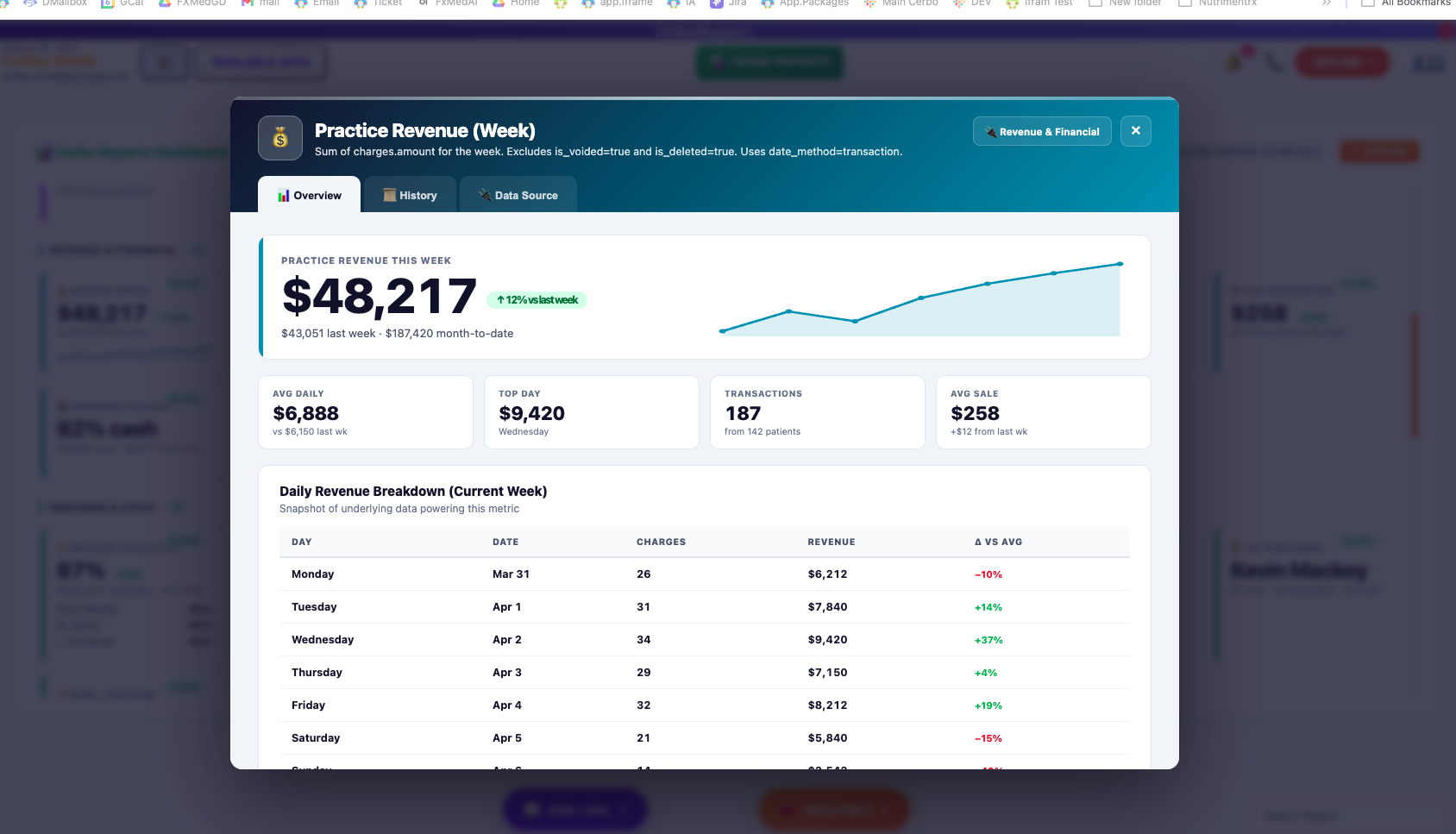
Click any tile from the dashboard and a full report card opens with three tabs. The story behind the number — instantly visible.
|
|
|
|
Tab 01
Overview
The headline number. Trend arrow vs. prior period. Inline area chart. Four contextual metric cards.
|
|
|
Tab 02
History
The longitudinal view. Weeks, months, quarters. Spot the patterns. Catch the trends.
|
|
|
Tab 03
Data Source
The full breakdown. Color-coded variance. The exact rows powering the headline number.
|
|
|
|
iii. The Auto-Email Alignment Engine
The right reports. The right people. The same picture.
A unified dashboard is powerful. A unified team is unstoppable. Every report ships with built-in Auto Reporting Email — beautifully designed PDFs delivered automatically, on the schedule you set, to exactly the people who need them.
|
|
|
Four steps. That’s it.
|
01
|
Pick the reports.
Choose any combination — by category, by team, by topic.
|
| |
|
02
|
Title them.
“Weekly Operations Report.” “Q3 Provider Performance.” Whatever fits.
|
| |
|
03
|
Choose the recipients.
Practice manager, billing, ops lead, providers — whoever needs to see it.
|
| |
|
04
|
Set the cadence.
Daily, weekly, monthly, quarterly, custom — built around how your practice runs.
|
|
|
|
In Practice · Real Alignment
Different teams. Different reports. One shared reality.
Practice Manager
Practice Revenue (Week), Provider Utilization, Active Patients, Re-Activation, Top Performer Leaderboard. Every Monday 7am.
Billing Team
Revenue Per Patient, Charges, Transactions, Top-Selling Items, Outstanding Balances. Every Friday 4pm.
Ops Lead
Encounters (Week), Schedule Utilization, Pending Forms, HM Due, Refills Due, Tasks Volume. Every morning 6am.
|
|
|
iv. Why This Matters
Aligned teams. Aligned data. That’s leadership.
|
|
|
Most practices don’t have a data problem. They have an alignment problem. Your provider sees one slice. Your billing team sees another. Your ops lead is working from a third. Everyone is working hard. Everyone is working differently. Everyone is reacting to a partial picture.
When the same dashboard powers every conversation in your practice — when your Monday meeting starts with everyone already looking at the same revenue trend, the same utilization patterns, the same patient flow — something fundamental shifts. You stop having “what’s actually happening?” conversations and start having “what should we do next?” conversations.
That’s not reporting. That’s leadership.
Cerbo holds the truth. The Visual Reporting System aligns your team to it.
|
|
v. The Trilogy, Complete
Three releases in. The nervous system is awake.
|
|
|
Patient Portal Health Insight gave the patient a way to finally see their own health journey — vitals, labs, supplements, medications, alternate plans, all in one longitudinal timeline.
Cerbo ↔ Heidi Bi-Directional gave the provider an AI scribe that finally understands who the patient is — every relevant piece of clinical context flowing into Heidi automatically before each appointment, the encounter flowing back to Cerbo after.
And now the Portal Cerbo Visual Reporting System gives the practice a way to finally see itself — eight visual lenses, three-tab drill-downs, the right reports landing in the right inboxes automatically.
Patient. Provider. Practice. Three pillars. All carrying Cerbo’s signal where it was always meant to go.
|
|
Want the Visual Walkthrough?
See the full reporting system live.
The Portal Cerbo Visual Reporting System product page shows every lens, every drill-down tab, the auto-email alignment engine, and how it all fits together in your practice.
See the full Visual Reporting page →
|
|
Stop the guessing.
Start knowing.
Existing FxMedSupport practices: submit a ticket and we’ll turn on the Visual Reporting System. New to FxMedSupport? Open your account or schedule a demo built around how your practice actually runs.
|
|
|
─── What’s Next
That closes the launch trilogy. From here we shift to a monthly cadence of major updates as we ship.
Provider i in weeks. The internal ticket system and lightweight CRM widget at the Elite tier. The next “I wish” the Cerbo community brings us — exactly the way it has been for ten years.
|
|
|
|
The DreamMakers of Cerbo.
Built on Cerbo · Since 2016
|
|